How to Make a Free Website — Step-by-Step for Anyone
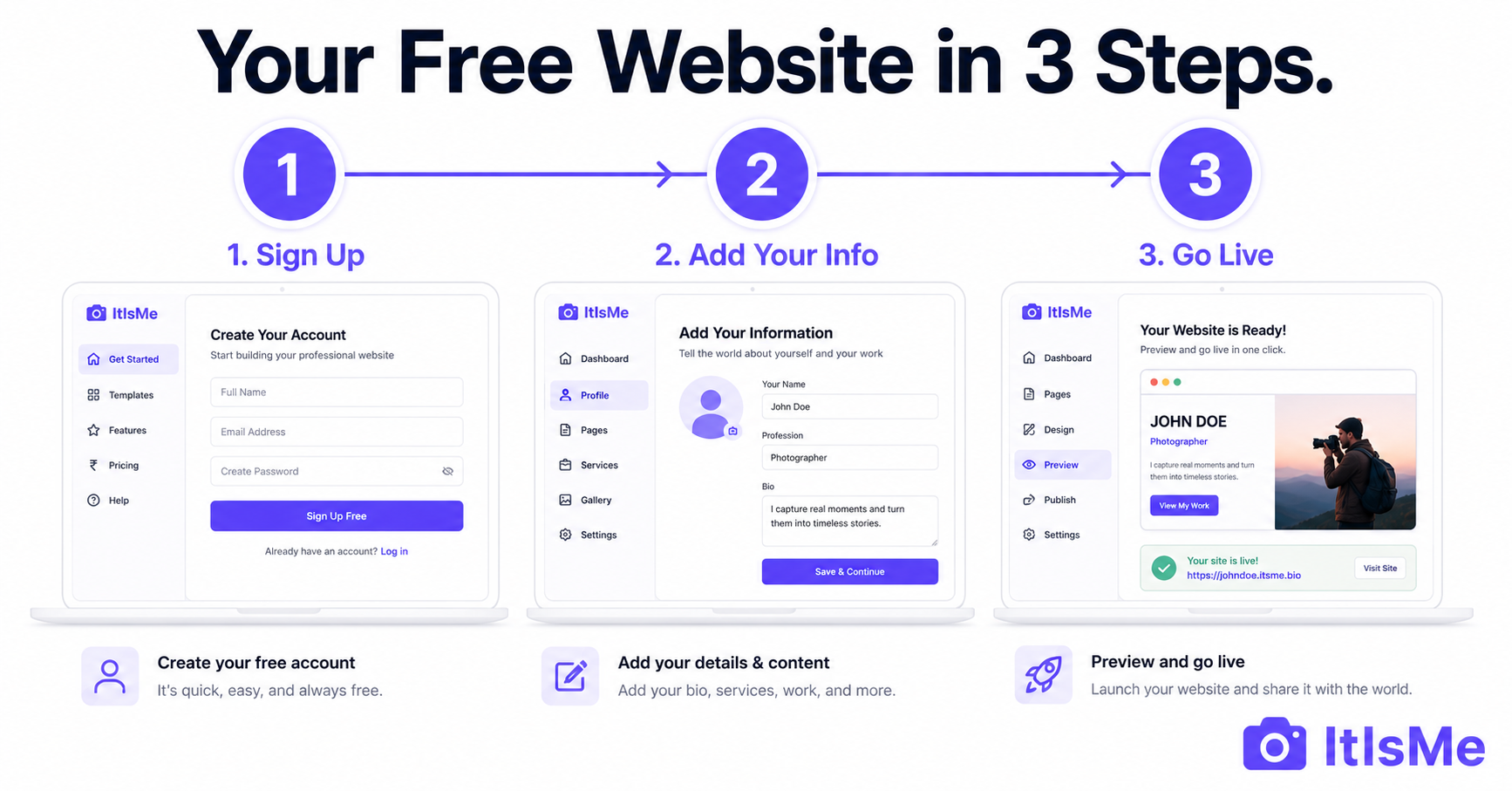
You do not need a developer, a designer or a budget to have a professional website in 2026. You need about 5 minutes and an internet connection. This guide walks you through exactly how to make a free website — from signing up to going live — with no coding, no credit card and no technical knowledge required.
And once your website is live, you can manage it entirely from your phone using the ItIsMe Android app — capture a photo and publish it directly to your website in seconds, without opening a browser or sitting at a desk.
Whether you are a freelancer who wants clients to find you online, a small business that needs a professional web presence, a student building your first digital profile, or anyone who simply wants their own corner of the internet — this is the place to start.
What Makes ItIsMe Different from Other Free Website Builders?
Before the steps, it helps to understand what you are actually getting — because ItIsMe is built differently from most free website options:
Two website modes — Personal and Business: When you create your ItIsMe website, you choose the mode that fits you. Personal mode is designed for individuals — freelancers, students, creatives, professionals — and organises your site around your skills, projects, services and bio. Business mode is designed for businesses — shops, clinics, restaurants, studios — and gives you a fully customisable hero section with your brand name, tagline, feature highlights, CTA buttons and company logo. Most free website builders give everyone the same rigid template. ItIsMe adapts the entire structure to your purpose.
Android app for website management: ItIsMe is the only free website platform that gives you a dedicated Android app to manage your site from your phone. You do not need to open a browser or log into a dashboard. Open the app, tap to update your services, capture a photo and it publishes directly to your website instantly. Your website goes with you — not just the device it was built on.
Built-in AI chat assistant: Every ItIsMe website comes with an AI chatbot trained on your own information. You write the questions and answers once — your rates, availability, what you offer. The AI answers every visitor who asks, automatically, 24 hours a day.
A real multi-page website — not a link page: Your ItIsMe site has real pages — About, Projects, Services, Products, Blog and a Contact form. It is not a list of buttons. It is a complete website at your own URL: itisme.in/yourname.
What You Need Before You Start
Nothing complicated. Just have these ready:
- Your name or business name — becomes part of your website address
- A short description of what you do — 2 to 3 sentences
- Your services or what you offer — with prices if you want to show them
- 1 to 5 examples of your work — photos, project descriptions, results
- A way for people to contact you — email, phone or WhatsApp number
That is everything. Start with what you have — your website grows with you.
How to Make a Free Website on ItIsMe — Step by Step
Step 1 — Sign Up for Free
Go to itisme.in and click the sign-up button. Enter your name, email and phone number. No credit card required — the Basic plan is completely free, permanently. After you register, the ItIsMe team reviews your account (usually within 24 hours) and sends your login credentials by email. This review step ensures quality and prevents spam accounts from being created.
Step 2 — Claim Your Website Address and Choose Your Mode
Once you log in, the first thing you do is choose your website name. Your website goes live at itisme.in/yourname — for example, itisme.in/priyasharma, itisme.in/sunflowerstudio or itisme.in/rameshlawyer. Choose something clean and professional. This is the link you will put in your bio, your visiting card and every email you send.
Then choose your mode:
- Personal mode — if you are an individual showcasing your skills, work, services and personal story. Best for freelancers, students, tutors, designers, writers, photographers and all independent professionals.
- Business mode — if you are running a business and want to showcase your brand, team, products, services and business information. Best for shops, clinics, restaurants, salons, studios and service businesses. Business mode gives you a customisable hero section with your brand name, tagline and company logo.
You can switch between modes from your dashboard at any time.
Step 3 — Fill In Your Sections from the Dashboard
Your website has several sections you fill in from your dashboard. Each one takes just a few minutes:
About: Write 3 to 5 sentences about who you are and what you do. Be specific — mention your profession, your experience and who you work with. This is what visitors read first.
Services: List what you offer with a short description and a starting price. "Logo Design from $75" or "Maths Tuition — Grades 8 to 12 — ₹2,000/month" — clear, specific and honest. Visitors who see your pricing upfront are warmer leads than those who have to ask.
Projects / Gallery: Add examples of your work. For each project, include a title, a description of what you did, and an image. Five strong examples are more effective than twenty average ones. If you are just starting, add personal projects, practice work or anything that shows your skill.
Products (Business mode): If you run a business selling products, add them with images, descriptions and enquiry options so customers can browse your range directly on your website.
Blog: Write posts about your work, your field or topics your audience cares about. Blog content helps your website appear in search results over time. Start here once your core sections are filled.
Contact: Your built-in contact form comes with the site — visitors fill it in and the message comes directly to you. Add your WhatsApp number here too.
Step 4 — Train Your AI Chat Assistant
This is the feature that separates an ItIsMe website from a basic profile page. Every website includes a built-in AI Chat Assistant — a bot that sits on your site and answers visitor questions automatically, 24 hours a day, without you needing to respond manually.
To set it up, go to the AI Chat section of your dashboard and add Q&A pairs. Write the questions people ask most often — "What are your rates?", "Are you available next month?", "What does your service include?" — and write your answers. The AI learns from what you write and responds to visitors with your exact answers in real time, even at 2am while you are asleep.
You can also update the AI's knowledge from the Android app — add new questions, update your rates or change your availability directly from your phone, and the changes go live on your website instantly.
Step 5 — Download the Android App and Manage Your Website From Your Phone
This is what makes ItIsMe genuinely different from every other free website platform. Once your website is live, download the ItIsMe Android app on your phone.
With the app, your website is no longer tied to a laptop or a browser. Here is what you can do directly from your phone:
- Instant photo upload — capture a photo with your phone camera and publish it directly to your website in seconds. No transferring files to a computer, no resizing, no uploading through a browser.
- Write and publish blog posts — write a post from your phone and it goes live on your website immediately.
- Update your services — change pricing, edit descriptions or add a new service in real time.
- Manage your products — add new products, update photos or change availability anytime.
- Control your AI assistant — update the AI's knowledge base, add new Q&A pairs and manage how it responds to visitors.
- Real-time updates — every change appears on your website instantly. No publishing delay, no cache clearing needed.
Whether you are at a client meeting, on a shoot, or sitting in a cafe — your website goes with you. That is not something any other free website platform offers.
Step 6 — Share Your Website Link Everywhere
Your website cannot help you if no one knows it exists. Once it is live, share your link immediately:
- Add it to your Instagram bio right now
- Put it in your LinkedIn headline
- Set it as your WhatsApp status
- Add it to your email signature
- Print it on your visiting card
- Include it at the bottom of every proposal, estimate or application you send
One link — itisme.in/yourname — does the job of a portfolio, a business card, a services brochure and a 24/7 customer support agent, all at once.
What Makes a Free Website Worth Visiting?
A website is only as valuable as the content inside it. Here is what separates one that generates enquiries from one that nobody visits twice:
Specificity beats vagueness. "I am a freelance graphic designer based in Nairobi with 4 years designing for e-commerce brands" is infinitely more compelling than "I am a passionate creative professional." Real details build real trust.
Show your work, not just your claims. Every section should link to evidence — a project image, a client result, a before-and-after. "Designed new packaging for a food startup; they grew from 200 to 2,000 followers in 3 months" is proof. "I deliver high-quality work" is not.
Keep it updated. Add new projects as you complete them. Update your rates when they change. A website that has not been touched in 18 months signals to visitors that you may not be active. The Android app makes this effortless — you can update your website in 30 seconds from anywhere.
Free Websites for Every Type of Person
ItIsMe works for anyone who wants a professional online presence. Here are some of the most common uses:
| Who You Are | Best Mode | What Your Website Does | Guide |
|---|---|---|---|
| Freelancer | Personal | Attracts clients, shows your work, handles enquiries 24/7 | Free Website for Freelancers |
| Student | Personal | Stands out in applications, shows projects beyond a resume | Free Website for Students |
| Tutor or Coach | Personal | Students see subjects, fees and availability — enquire any time | Free Website for Tutors |
| Small Business | Business | Customers find your business, see products and services, contact you | Free Business Website |
| Photographer | Personal | Gallery, packages and prices — manage photos from your phone | Free Website for Photographers |
| Creator or Influencer | Personal | A real website behind your bio link — not just a list of buttons | Better Than a Link Page |
What Is Included in the Free Plan?
| Feature | Basic (Free) | Professional (₹999/yr) | Enterprise (₹1,999/yr) |
|---|---|---|---|
| Your own website URL | ✅ | ✅ | ✅ |
| Personal and Business modes | ✅ Both included | ✅ | ✅ |
| Android app | ✅ Full access | ✅ | ✅ |
| AI chat assistant | ✅ Included | ✅ | ✅ Advanced |
| Project / work slots | 5 | 50 | 999 |
| Blog posts | 5 | 100 | 999 |
| Gallery images | Unlimited | 200 | 999 |
| Products / shop | No | 100 | 999 |
Frequently Asked Questions
Can I really make a website for free?
Yes. With ItIsMe, the Basic plan is permanently free — no credit card, no time limit. You get a real website at itisme.in/yourname with your own sections, AI chat assistant, contact form and Android app access. There is no hidden fee to activate the site or make it live.
Do I need coding skills to make a free website?
No. ItIsMe requires zero coding. Fill in your information through the dashboard or the Android app and the platform handles all the technical work automatically — hosting, mobile responsiveness, fast loading, SEO structure. No HTML, no CSS, no developer needed at any stage.
Can I manage my website from my phone?
Yes — and this is one of the biggest advantages of ItIsMe over other free website platforms. Download the ItIsMe Android app and you can manage your entire website from your phone. Capture a photo and publish it instantly, write blog posts, update services, manage products and control your AI chat assistant — all without opening a browser or sitting at a computer. Your website goes wherever you go.
What is the difference between Personal mode and Business mode?
Personal mode is for individuals — freelancers, students, creatives and professionals — and organises your site around your skills, projects, services and personal bio. Business mode is for businesses and gives you a fully customisable hero section with your brand name, tagline, feature highlights, CTA buttons and company logo. You can switch between modes from your dashboard at any time.
How long does it take to make a free website?
A basic setup takes about 5 minutes. A complete website with multiple projects, services, a trained AI chat and a few blog posts takes 30 to 60 minutes — easily done in one sitting. With the Android app, you can continue building and updating from your phone anytime after that.
Will my free website appear on Google?
Yes. Your ItIsMe website at itisme.in/yourname is a real public webpage that Google can index. Over time, as your site gets visited and linked by others, it can appear in search results for your name and profession — bringing you visitors beyond just people you share the link with directly.
Make Your Free Website Today
You have spent long enough without a website. Everything you need is here — a free plan, two modes to fit your purpose, an Android app to manage everything from your phone, and a built-in AI that handles enquiries for you around the clock.
Your website address is waiting. Go claim it.
Create your free website on ItIsMe →
Also read: What Is a Website and What Should It Include? | Free Website Builder — Everything You Need | Why a Real Website Beats a Link Page